اس صفحے پر
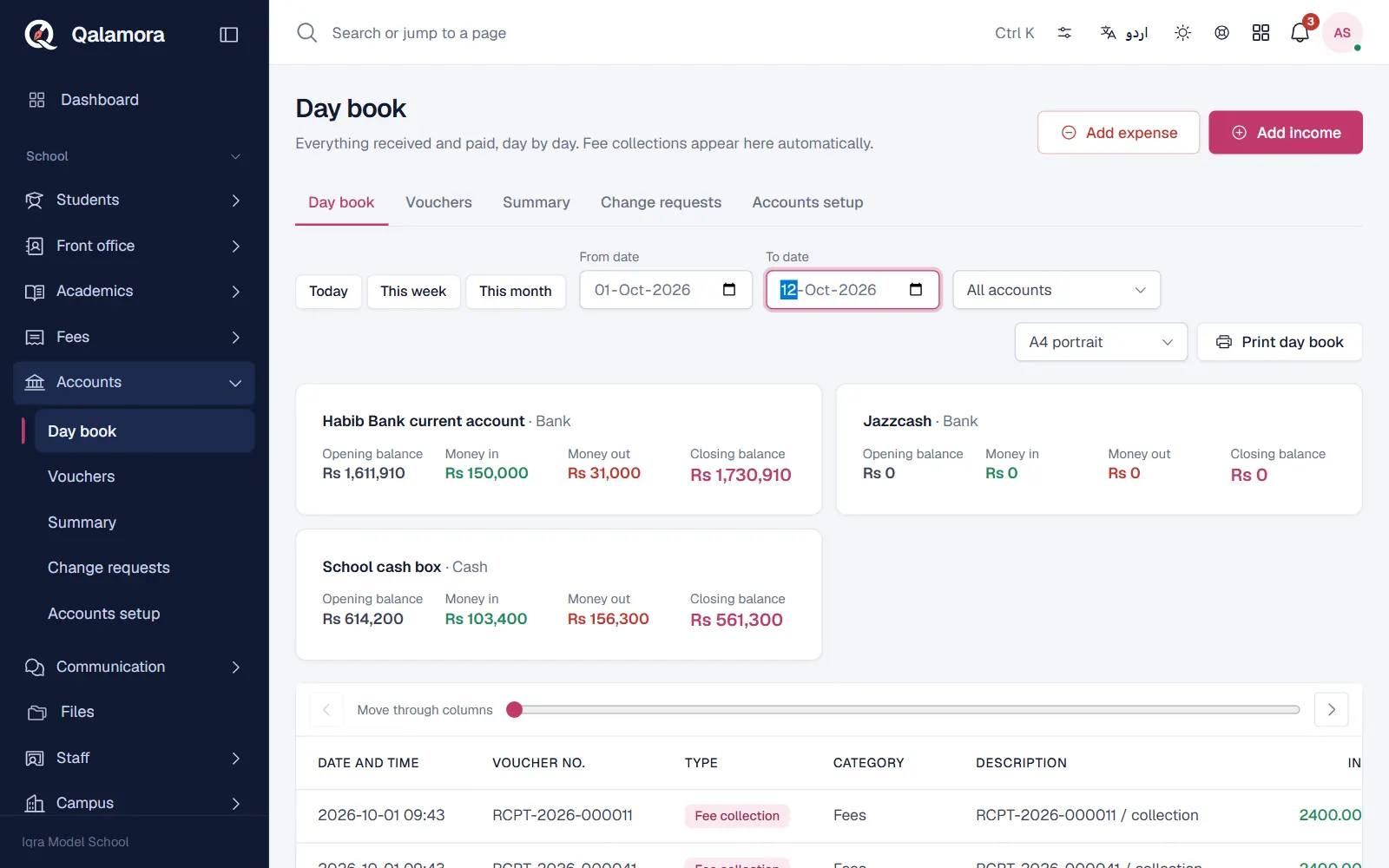
The Day book is the first tab of Accounts. It shows everything received and paid, day by day, with a running balance. Fee collections appear here automatically, so the accountant only adds the other vouchers.
Steps
- Open Accounts. The Day book tab opens on today.
- Choose the period. Use Quick range (Today, This week, This month) or set From date and To date.
- Choose the account. Leave All accounts or pick one cash or bank account.
- Read the balances. For each account you see the Opening balance, Money in, Money out and Closing balance, then each entry with its time, voucher number, type, in, out and running balance.
- Print it. Click Print day book for the period on paper, for example to close the cash at the end of the day.
Monthly summary
Open Accounts > Summary and pick a Month. You see Total income, Total expense and the Net (income minus expense), with income and expense by category. Transfers between your own accounts are not counted.
مشورہ
Long periods show the first 1000 entries only. For a full year, print one month at a time.
Related
کیا یہ صفحہ مفید تھا؟
سن کر خوشی ہوئی۔ آپ کا جواب کہیں بھیجا یا محفوظ نہیں کیا جاتا۔
معذرت۔ ہمیں بتائیں کیا کمی تھی، ہم یہ رہنمائی بہتر کریں گے۔ ہمیں بتائیں