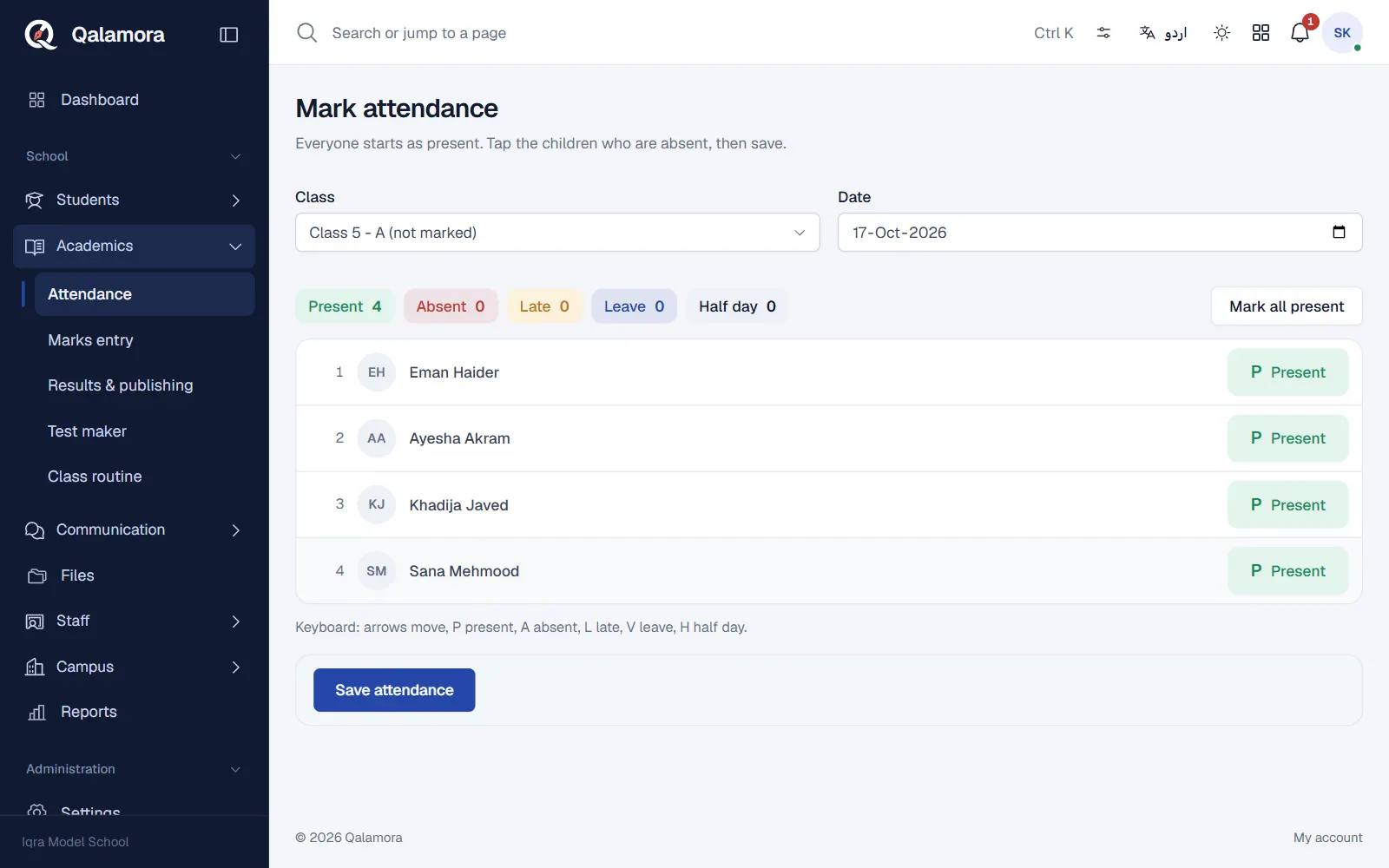
The morning register takes one screen per class. Every child starts as Present, the teacher taps only the children who are absent, late or on leave, and saves. Teachers normally mark their own classes; principals can mark or correct any class.
Before you start
- Your classes, sections and students must be set up, and a current school year must exist (Settings > Academic setup).
- Your login needs the permission to mark attendance. The Teacher role has it by default.
- Attendance cannot be marked for a future date, a weekly off day or a holiday. The screen tells you when the school is closed.
Steps
- Open the register. Go to Academics > Attendance. On a teacher login you can also tap your class in the Attendance to mark today card on the home page, which opens the right register directly.
- Choose the class and date. Pick the class and section in Class. Classes that still need a register say (not marked). The Date is today; the screen remembers the last class you opened.
- Tap the children who are not present. Each tap on a child's status moves it to the next one: Present, Absent, Late, Leave, Half day. The counts above the list update as you go.
- Save. Press Save attendance. A message confirms how many children are absent.
Tip
On a computer you can mark without the mouse: arrow keys move between children, and the keys P, A, L, V (leave) and H (half day) set the status.
Correcting a register
- The teacher who marked a register can change it again on the same day. Open the same class and date, change the status and save.
- Earlier dates and another teacher's register can only be changed by someone with the permission to correct earlier registers (the principal by default). Others see the register read-only with a note.
- Every correction is kept in the audit log with the old and new status, and the register shows This register was corrected after it was first saved.
If a class is missing from the list
- A class with no enrolled students is not shown.
- Your school may have turned on Teachers may mark attendance only for sections they teach in Settings > Attendance. Then a teacher sees only the sections they are listed for in Academics > Class and subject teachers.
Related
Was this page helpful?
Good to hear. Your answer is not sent or saved.
Sorry about that. Tell us what was missing and we will improve this guide. Tell us