On this page
Templates save you from typing the same message every month. A template holds the text once, with placeholders such as {student_name} that Qalamora fills in for each parent. Qalamora also ships a gallery of ready templates in English and Urdu that you can add with one click. The principal manages templates by default.
Steps
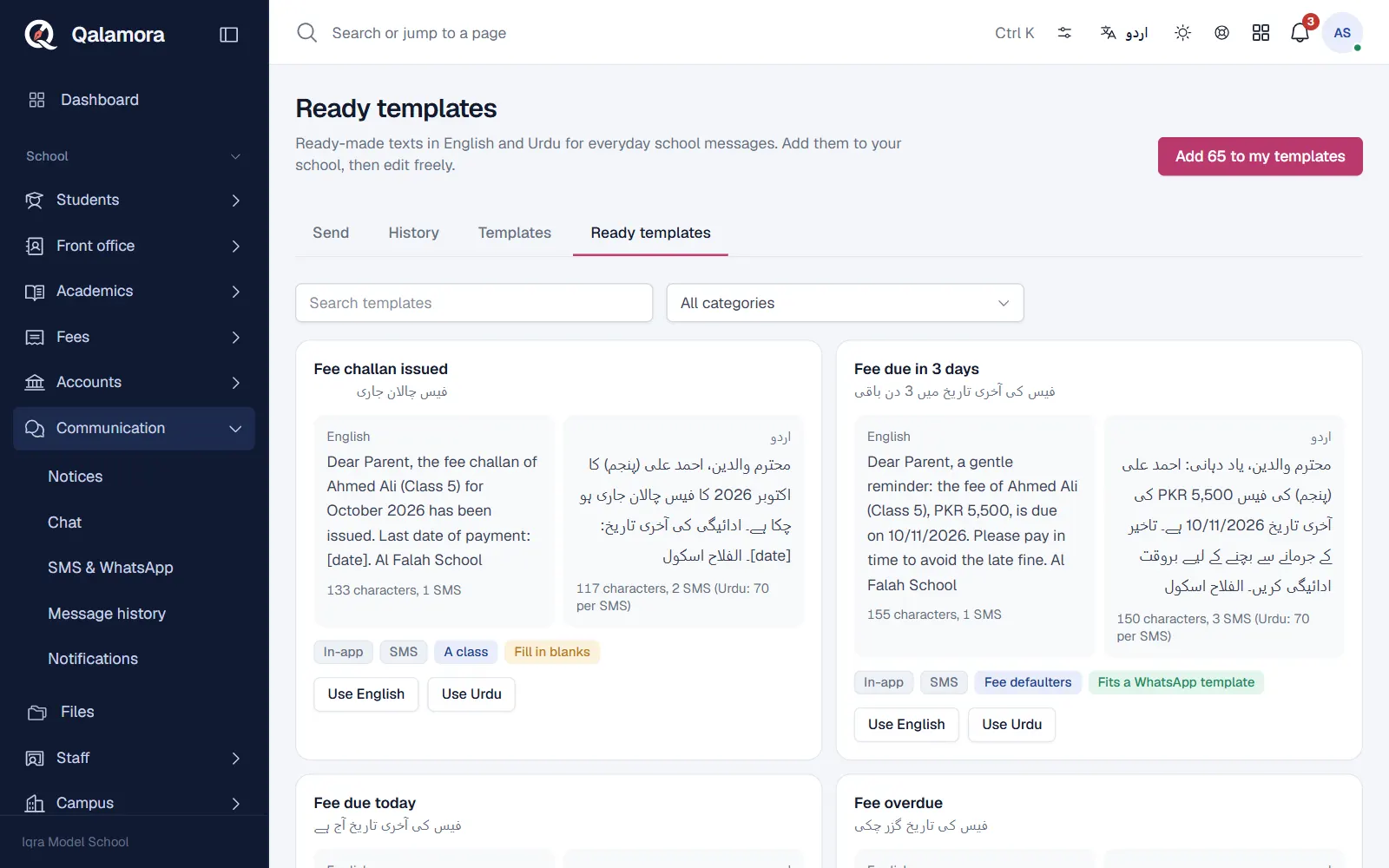
- Open Communication > SMS & WhatsApp. Click the Ready templates tab.
- Find what you need. Use Search templates or choose a category such as Fees, Attendance, Exams and results, Holidays and events or Transport. Each card shows the English and Urdu text, how many SMS it uses, and whether it Fits a WhatsApp template.
- Add them to your school. Click Add N to my templates. With a category chosen, only that category is added; with All categories, all of them. Templates you already added are skipped, and your own edits are never overwritten.
- Edit if you want. Open the Templates tab and click the pencil on a template to change its Name, Channel, Category, Text or Urdu text.
- Use it when sending. On the Send tab choose it under Template. You can also click Use English or Use Urdu on a ready template card to open the Send page with that text.
Write your own template
On the Templates tab click New template, give it a name, choose the channel (SMS and WhatsApp, SMS or WhatsApp) and a category, and type the text. Leave Show on the Send page ticked so senders can pick it. Add ready-made templates adds four basic starter texts (fee reminder, absence alert, general notice, result announced) if they are missing.
Placeholders
| Placeholder | Filled with | Works for |
|---|---|---|
| {school_name}, {school_phone}, {date}, {month} | Your school's details and today's date | Every audience |
| {student_name}, {father_name}, {guardian_name} | The student and their guardian | Parent audiences |
| {class}, {section}, {roll_no}, {admission_no} | The student's class details | Parent audiences |
| {amount_due}, {due_date} | Unpaid fees and the oldest last date | Parent audiences, needs Fees |
| {staff_name} | The staff member's name | Staff |
A placeholder that does not apply to the chosen audience is refused when you preview. Typed numbers only get the school placeholders, because Qalamora does not know whose number it is.
Blanks in square brackets
Some ready templates contain blanks such as [date], [time] or [reason]. These are things only you know. The Send page highlights them and will not send until you type over each one.
Templates and WhatsApp
WhatsApp requires business messages to use templates approved by Meta. To use one, register the same wording in your Meta account, then enter its WhatsApp template name and WhatsApp language code (for example fee_reminder and en) on the Qalamora template. Leave these empty for plain text.
Tip
Urdu text uses Unicode SMS, which fit 70 characters each instead of 160. Check the SMS count on the card before sending an Urdu template to the whole school.
Related
Was this page helpful?
Good to hear. Your answer is not sent or saved.
Sorry about that. Tell us what was missing and we will improve this guide. Tell us