اس صفحے پر
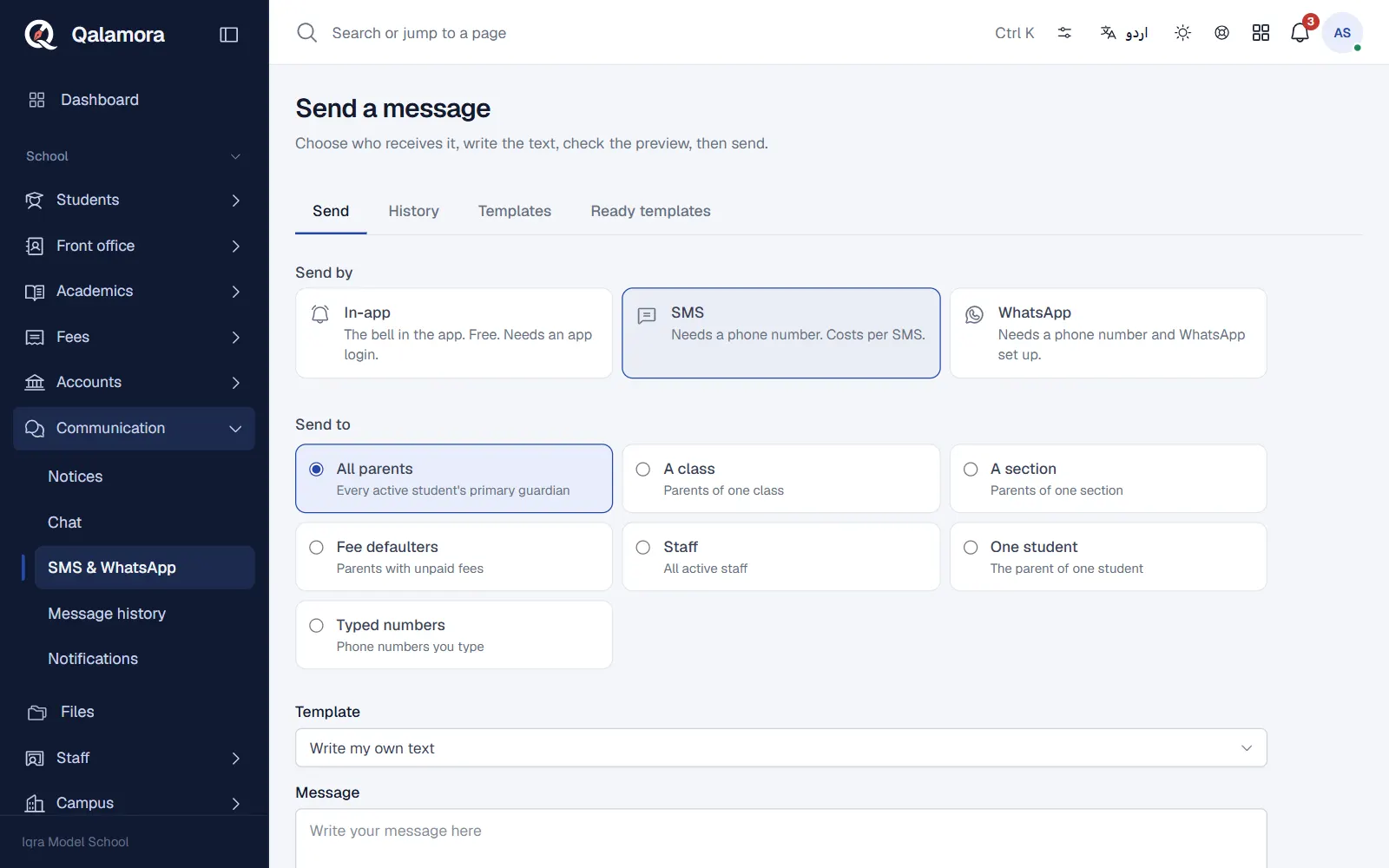
The SMS & WhatsApp page sends one message to many people at once: all parents, one class, fee defaulters, staff or numbers you type. Each person gets their own text with their child's name, class or dues filled in. The principal, front desk and accountant can send by default.
Before you start
- The Messages module must be on (Settings > Modules).
- In-app messages (the bell) need no setup and cost nothing. They reach people who have a Qalamora login.
- SMS and WhatsApp need your school's own provider account, connected once by the principal (see "Connect your SMS or WhatsApp provider" below). Your provider charges you at its rates.
Steps
- Open Communication > SMS & WhatsApp. The Send tab opens.
- Choose the channels. Under Send by tick In-app, SMS and/or WhatsApp. If you tick in-app together with SMS or WhatsApp, choose In-app first. SMS and WhatsApp only for people without an app login (saves SMS cost) or Send on every chosen channel.
- Choose who receives it. Under Send to pick All parents, A class, A section, Fee defaulters, Staff, One student or Typed numbers. Typed numbers can be written as 0300-1234567 or +92 300 1234567, one per line.
- Write the message or pick a template. Choose a Template or keep Write my own text. Click a chip under Insert details to add a placeholder such as {student_name} or {amount_due}. The counter shows the characters and how many SMS each message uses. Urdu text uses shorter SMS (70 characters each).
- Click Preview. Nothing is sent yet. The Who will get this panel shows how many people are reached on each channel, the total SMS parts, an SMS cost estimate (when your SMS price is set), skipped numbers and the first few messages exactly as they will arrive.
- Send. Click Send to N recipients. Messages go out in the background. Click Open delivery log to follow them.
مشورہ
If the text still contains a blank in square brackets such as [date] (from a ready template), Qalamora will not send until you type over it.
Follow delivery
Communication > Message history lists every batch with its channel, audience and counts of sent and failed messages. Open a batch to see each recipient, their status (Queued, Sent, Delivered, Failed) and the reason for any failure. Each student's profile also has a Messages tab listing everything sent about that student.
Connect your SMS or WhatsApp provider
The principal opens Settings > Message providers:
- SMS: choose Pakistani SMS gateway (HTTP) and enter the gateway URL (https), API key and the field names your gateway uses, or choose Twilio.
- WhatsApp: choose WhatsApp Cloud API (Meta) and enter the phone number ID and access token.
- Until a provider is saved, Test mode (nothing is sent) is used: messages are marked sent but nobody receives them.
Keys are stored encrypted and never shown again. Click Send test to check the connection with your own number. Under Sending defaults you can set the channels the Send page starts with and the Price of one SMS (paisa), for example 250 for Rs 2.50, which drives the cost estimate.
نوٹ
WhatsApp only delivers free text to people who messaged your number in the last 24 hours. For everyone else, use a template approved by Meta and enter its name on the template in Qalamora.
Rules worth knowing
- A batch can have up to 5,000 recipients. Invalid numbers are skipped and listed in the preview.
- Duplicate numbers are removed, unless the text uses a per-student placeholder (then siblings each get their own message).
- Fee defaulters and the {amount_due} and {due_date} placeholders need the Fees module and fee viewing permission.
- In-app messages to parents reach the login linked to the child's guardian. Tick Also notify the student login to include students.
Related
کیا یہ صفحہ مفید تھا؟
سن کر خوشی ہوئی۔ آپ کا جواب کہیں بھیجا یا محفوظ نہیں کیا جاتا۔
معذرت۔ ہمیں بتائیں کیا کمی تھی، ہم یہ رہنمائی بہتر کریں گے۔ ہمیں بتائیں