اس صفحے پر
All exam printouts for a class come from one place. They print in plain black and white, so they photocopy cleanly on any office printer. Printing needs the exam printouts permission, which the principal has by default.
Steps
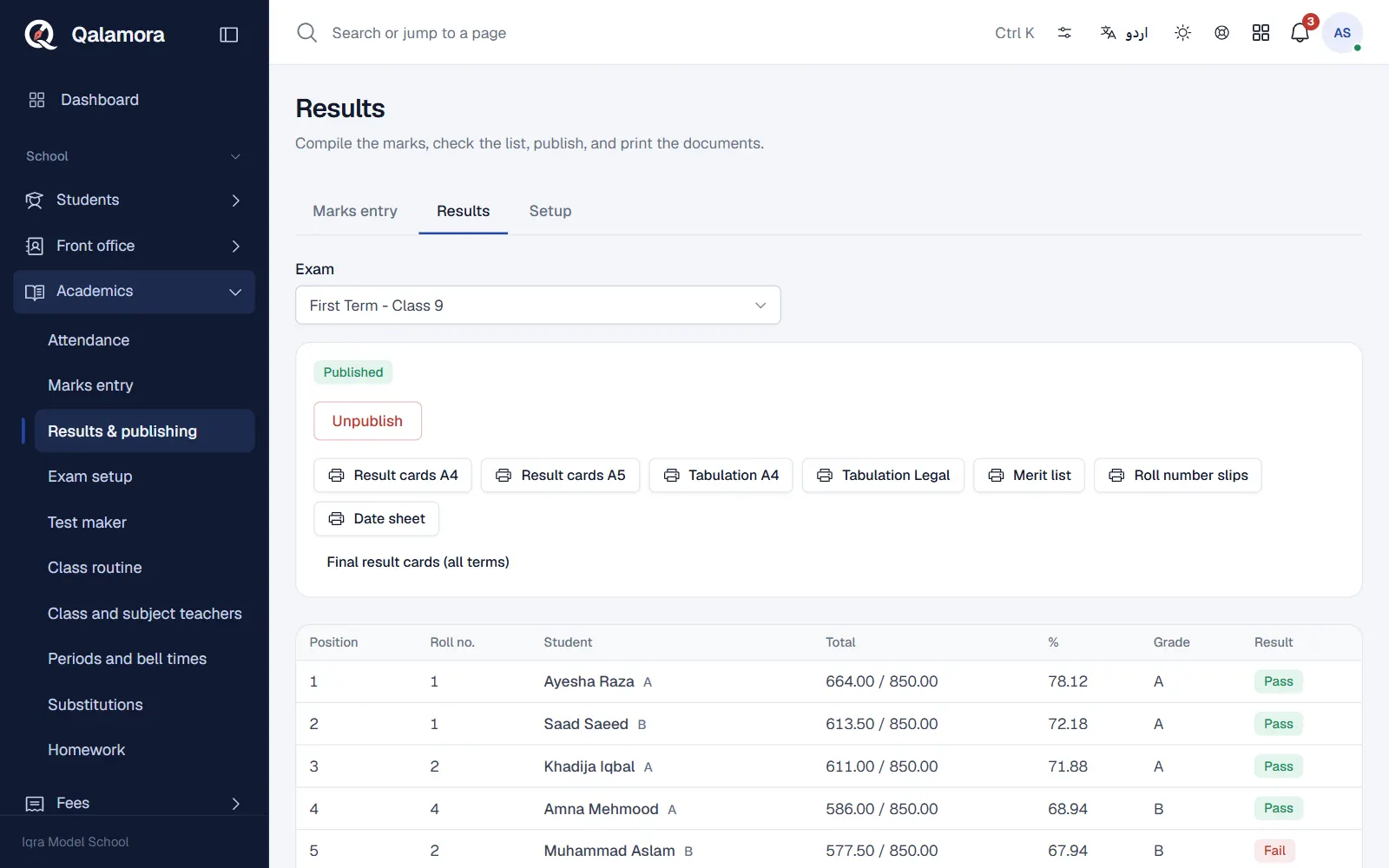
- Open Results. Go to Academics > Results & publishing and choose the Exam.
- Compile first. Result cards, tabulation and merit list use the compiled results, so press Compile results if you have not.
- Choose what to print. Press one of the print buttons under the publish choices:
- Result cards A4 or Result cards A5: one card per student.
- Tabulation A4 or Tabulation Legal: the class against all subjects with totals, grade and position.
- Merit list: students in position order.
- Roll number slips: one slip per student for the exam.
- Date sheet: the exam timetable from the subjects and dates you set.
- Open the PDF. The PDF is prepared and opens in a new browser tab. Print it from there or save it.
What a result card shows
The student's name, father name, GR number, class, roll number and session, then each subject with maximum marks, obtained marks and grade, the total, percentage, grade, result and position. When the Attendance module is on, the card also shows the student's attendance percentage. At the bottom there are signature lines for the class teacher, the principal and the parent.
نوٹ
A card printed before the results are published is marked Provisional, not yet published.
Final result cards
Final result cards (all terms) combines every term that has a weight into one yearly card, using the weights set on the terms. It can only be made when every weighted term of that class is published.
One student's card
- Staff can open a student's profile, go to the Exams tab and press Print result card.
- Parents and students can open Results in their app and press Download report card for any published result.
Other exam reports
The Reports page also lists the exam reports: Tabulation sheet, Merit list, Subject-wise analysis (pass percentage, average and highest marks per subject) and Failures list, with PDF, Excel and CSV export.
Related
کیا یہ صفحہ مفید تھا؟
سن کر خوشی ہوئی۔ آپ کا جواب کہیں بھیجا یا محفوظ نہیں کیا جاتا۔
معذرت۔ ہمیں بتائیں کیا کمی تھی، ہم یہ رہنمائی بہتر کریں گے۔ ہمیں بتائیں