اس صفحے پر
Once your class fee plans are applied, a whole month of challans takes a minute. Challans are made in Fees > Challans by the accountant or principal.
Steps
- Open Fees > Challans. The Generate challans panel is at the top, the Challan register below it.
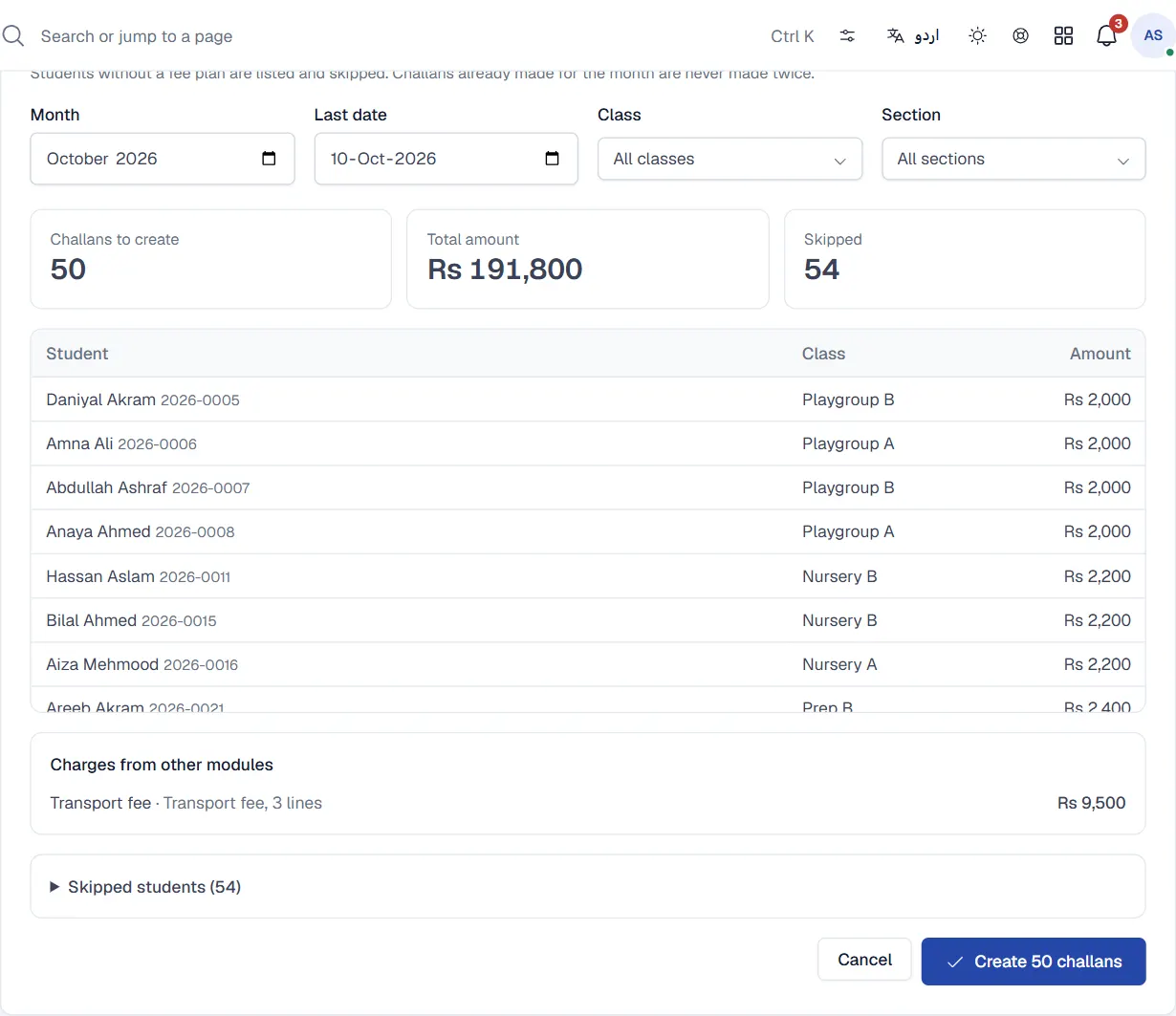
- Choose what to generate. Pick the Month and the Last date. Leave Class and Section on all for the whole school, or choose one class or section.
- Click Preview. Qalamora shows Challans to create, the Total amount, and Skipped students with the reason: No fee plan or Already made.
- Check charges from other modules. If transport or library charges are switched on, the preview lists them by fee head and warns about any that will be skipped.
- Click Create challans. The button shows how many will be made. When it finishes, the register opens on that month.
Things to know
- A student never gets two challans for the same month. Running it again only creates the missing ones, so it is safe to generate a new admission's challan later in the month.
- Each challan carries the student's fee plan, concessions, sibling discount and, if you print them, arrears from earlier months.
- Students without a fee plan are listed and skipped. Apply a plan to their class, then generate again.
Print the challans
- In the Challan register, filter by month, class and status.
- Choose the paper in the Paper menu at the top of the page (for example A4 landscape, 3 copies).
- Click Print challans. Qalamora shows what is Ready to print and which students are Not generated yet, with a button to generate the missing ones first.
- Click Print. Large batches are split into parts. Each part shows Preparing, then Ready: click Open PDF and print it.
To print only some challans, tick them in the register and click Print selected.
مشورہ
For a big school, print one class at a time. It is easier to hand challans out in class order.
Related
کیا یہ صفحہ مفید تھا؟
سن کر خوشی ہوئی۔ آپ کا جواب کہیں بھیجا یا محفوظ نہیں کیا جاتا۔
معذرت۔ ہمیں بتائیں کیا کمی تھی، ہم یہ رہنمائی بہتر کریں گے۔ ہمیں بتائیں