اس صفحے پر
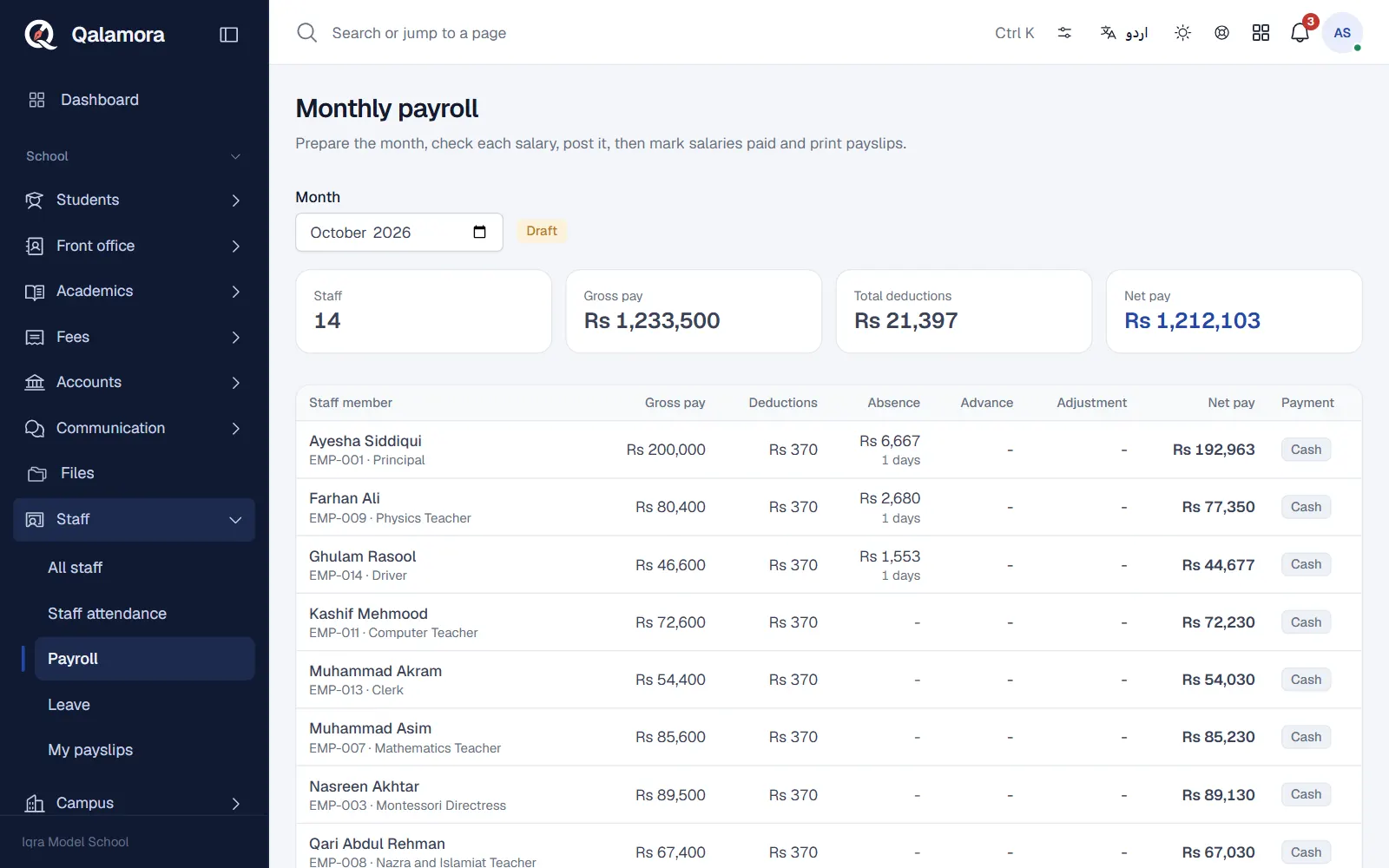
Payroll works out every staff member's salary for a month from their salary structure, absences, unpaid leave and salary advances. You check the figures, post the month, then record the payments. The owner sets salaries; the accountant usually prepares, posts and pays.
Before you start
- Set salaries. In Staff > Salaries, open each staff member and enter Basic pay (Rs) plus allowances and deductions. A change is saved as a new version from its Effective from date, so earlier months keep the old salary. Staff without a salary are left off the payroll and listed as a warning.
- Add salary heads. In Settings > Payroll, click Add common defaults for heads such as house rent, conveyance, medical, EOBI, provident fund and income tax, and choose the absence deduction rule (divide by 30, 26 or the days in the month).
Steps
- Open Staff > Payroll and choose the month. If nothing is prepared yet, click Prepare payroll for the month. Nothing is final at this stage.
- Check each line. The table shows Gross pay, Deductions, Absence, Advance, Adjustment and Net pay for every staff member. Staff who joined or left during the month are paid for their working days.
- Adjust where needed. Click the pencil on a line to change Days to deduct, the advance instalment for this month, or add an Adjustment (Rs) (a bonus as a positive amount, an extra deduction with a minus sign). An adjustment needs a reason.
- Recalculate after changes elsewhere. If you correct attendance, leave or a salary, click Recalculate. Your adjustments are kept.
- Post the payroll. Click Post payroll. The month is locked, advance instalments are recorded and staff with a login get a "payslip ready" notification.
- Mark salaries paid. Click Mark salaries paid, choose All unpaid salaries, Staff paid in cash or Staff paid by bank, the method, date and an optional reference. Each salary gets a payment number. With the Accounts module on, the money goes out of the day book.
- Print. Click Print payslips for the whole month, or Bank transfer list for your bank.
نوٹ
Nobody can change their own payroll line, and the person who last adjusted a line cannot post that payroll. A second person always posts. This keeps salaries honest.
How absences are deducted
When the absence deduction is on, the day rate is the monthly gross (or basic) pay divided by your chosen number. Absent days from staff attendance (half days count 0.5) and approved unpaid leave are deducted. Days on approved leave, late and present marks are not deducted.
Salary advances
In Staff > Salary advances, click Give advance, enter the amount, the number of Instalments and Recover from month. Qalamora recovers it in equal monthly instalments; the last one takes what is left.
Made a mistake after posting?
Click Reverse and write a reason. Advance instalments are given back and paid salaries are reversed in the day book. Then prepare and post the month again. Nothing is deleted; the history stays.
Related
کیا یہ صفحہ مفید تھا؟
سن کر خوشی ہوئی۔ آپ کا جواب کہیں بھیجا یا محفوظ نہیں کیا جاتا۔
معذرت۔ ہمیں بتائیں کیا کمی تھی، ہم یہ رہنمائی بہتر کریں گے۔ ہمیں بتائیں