When a student leaves, the record is not deleted. The student is struck off from the leaving date, and their history, fees and results stay for certificates and reports.
Steps
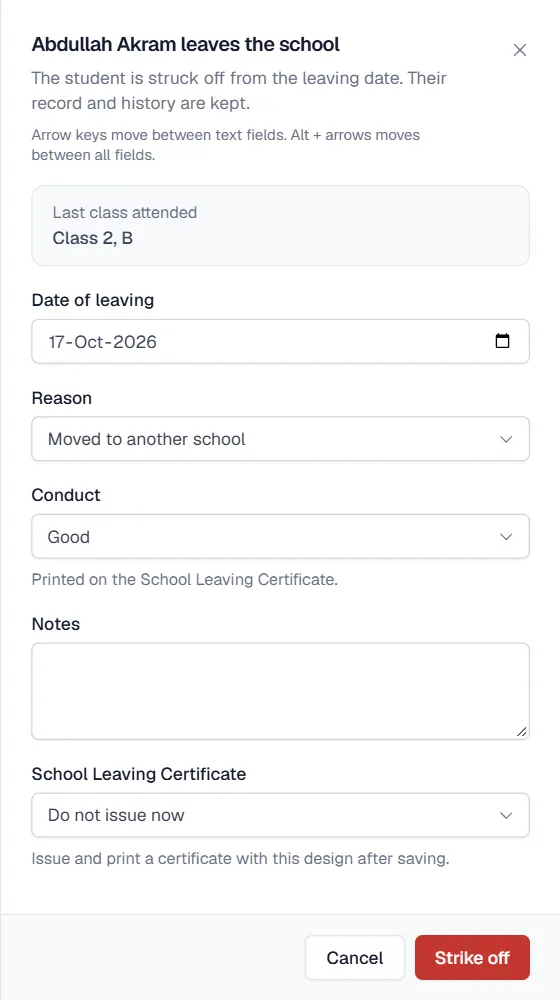
- Open the student's profile and click Leave school.
- Check the details. The Last class attended is filled in. Enter the Date of leaving.
- Choose the reason. For example Completed school, Moved to another school, Family relocated, Fee default, Disciplinary or Other, and add Notes if needed.
- Choose the conduct. Conduct (Excellent to Unsatisfactory, or Not stated) is printed on the School Leaving Certificate.
- Check fee dues. If fees are unpaid, Fee dues are outstanding appears with the amount. Collect them first, or tick Let the student leave with dues outstanding.
- Choose the certificate. Under School Leaving Certificate pick a certificate design to issue right after saving, or Do not issue now.
- Click Strike off. The student's status becomes Left.
Print the certificate later
Certificates can also be issued from the Certificates module. The leaving date, reason, conduct and last class are filled into the certificate from the student's history, so nobody types them again. Every issued certificate is kept in the certificate register.
Passing out a class
For a whole class finishing school, use Promote students and choose Pass out. Each student is marked Graduated.
نوٹ
A student who left is not billed on new challans and does not appear on attendance sheets. Bring them back with Re-admit.
Related
کیا یہ صفحہ مفید تھا؟
سن کر خوشی ہوئی۔ آپ کا جواب کہیں بھیجا یا محفوظ نہیں کیا جاتا۔
معذرت۔ ہمیں بتائیں کیا کمی تھی، ہم یہ رہنمائی بہتر کریں گے۔ ہمیں بتائیں